GCMESH / WINDOWS + MACOS

GCMesh. One keyboard. Every screen.

Share one keyboard and mouse across your computers. Connect Windows and macOS on your local network, arrange your screens and move naturally between them.

  • Windows and macOS
  • Local Network
  • Optional Clipboard Sync

PRODUCT SYSTEMS / 03

Tools for your desk and your Blender workflow.

Share input across two computers with GCMesh, control Blender from an iPhone with GCDeck, or preview Cam for virtual camera work.

PRODUCT / GCMESHPublic Beta

GCMesh

Share a keyboard and mouse between paired computers on your local network, including mixed Windows and Mac setups. Arrange your screens and optionally share the clipboard.

  • Supported systems: Windows and macOS
  • Custom screen layout
  • Optional clipboard sync
Explore GCMesh
PRODUCT / GCDECKiOS 17+

GCDeck

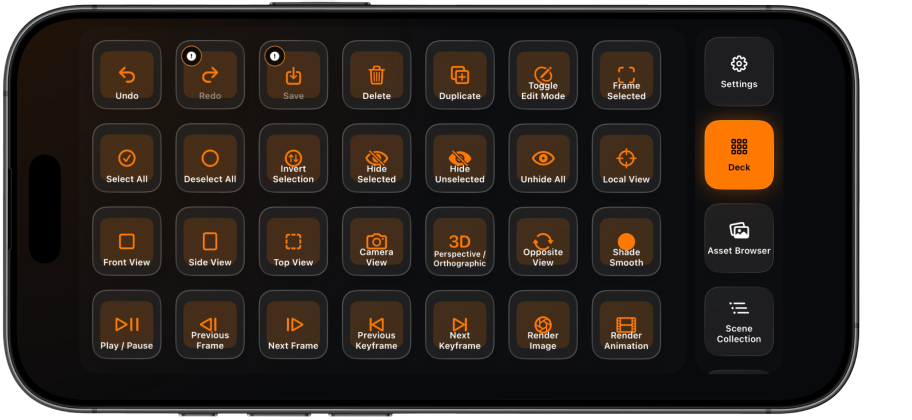
GCDeck connects an iPhone directly to Blender for contextual commands, configurable control screens, scene and timeline tools, supported assets, viewport navigation and reusable workflow macros.

  • Context-aware Command Deck
  • Natural viewport navigation
  • Scene Collection controls
Explore GCDeck
GCDeck control layout displayed on an iPhone in landscape orientation
PRODUCT / CAMIn Development

Cam

Cam uses motion, touch controls and local streaming to create a physical camera workflow for Blender virtual production.

  • Phone-driven camera movement
  • Relative and absolute rotation
  • Zoom and focal length control
Explore Cam

GCMESH / PUBLIC BETA

Set up your two computers.

Install GCMesh on both computers and pair them on your local network.

Download GCMesh